Key Attestation Demo
- 4.8
- Rating
- 100.00K
- Installs
- Free
- Price

 Analysis by App-foxy
Key Attestation Demo is a small, specialized Android app that makes sense once you understand what it is trying to show. I installed it expecting a practical utility, but it is better understood as a hands-on demonstration of Android’s Key Attestation capability. That distinction matters: this is not a password manager, a security scanner, or a general-purpose privacy tool. It is a focused way to explore how an Android system can attest to information about a cryptographic key.
My first impression was that the app assumes some curiosity about Android security. It does not try to entertain or guide every tap with consumer-friendly explanations. Instead, it gives the subject a place to be observed. For a developer, student, security enthusiast, or technically minded Android user, that narrow purpose is its main strength. For someone looking for an app that protects the phone automatically, it will feel too specialized.
The app comes from Xingchen & Rikka and is listed in the Libraries & Demo section. It is free, suitable for Everyone, and supports Android 7.0 or later. Its current version is 1.5.0. Those details make it easy to try on a compatible device without treating the installation as a major commitment.
You May Also Like

 Blood Strike: 2.5 Anniversary
Blood Strike’s Loadouts Turn Every Drop Into a Tactical Gamble
A close look at Blood Strike’s custom loadouts: how fast access to signature weapons reshapes its battle royale rhythm, rewards preparation, and narrows the gap between fights.

 Pandora - Music & Podcasts
Pandora’s Music Is Easy to Start, but Harder to Recover
Pandora’s strength is its low-effort path from a seed to a station. Its weak spot is how much confidence it asks you to place in connection, setup, and quiet recovery.

 8 Ball Pool
 Is Built on Rivalries, Rematches, and Routine
A close look at the rivalries, rematches, shared routines, and unanswered safety questions that turn a quick pool match into a persistent mobile community.

 Samsung Music
’s Quiet Strength Is Playing What You Already Own
Its reach comes less from spectacle than from dependable access to a personal library. That simplicity is both the app’s strongest retention engine and its ceiling.

 AccuWeather: Weather Radar
AccuWeather Review: A Quick, Clear Forecast for Everyday Decisions
For everyday plans, the best forecast is the one you can understand quickly. AccuWeather makes rain timing, radar, and local conditions easy to act on, with a few trade-offs.

 Hill Climb Racing
Why Hill Climb Racing Still Turns Crashes Into One More Run
A tiny car, a bumpy hill and one more upgrade: Hill Climb Racing keeps resurfacing because its simple chaos makes every near-miss feel personal.
More From Our News Desk
View All News


What to expect before you open it
The most useful way to approach this app is as a visual and practical introduction to a system security feature. Key Attestation relates to the process of checking claims associated with a cryptographic key. In plain language, the app helps you look at the kind of evidence Android can provide about key creation and the environment involved, rather than merely showing that a key exists.
That means the first meaningful result is not likely to be a button that improves your phone immediately. The result is understanding. You may see technical information that is more useful when you know why it matters: an application can use cryptographic keys, and an attestation response can help a service evaluate whether those keys were generated and protected in an expected way.
I would not install this expecting a complete lesson in public-key cryptography. The app is a demonstration, not a full course. It gives you a concrete place to examine the feature, but you may still need basic background knowledge to interpret every field. That is not a flaw in itself; it is simply the trade-off that keeps a narrowly focused demo from becoming an oversized tutorial.
There is also an important difference between using it on a personal phone and using it during development. On a personal phone, the app can answer a practical question such as, “What does Android expose about this security mechanism on my device?” In a development workflow, it can help you become familiar with the sort of information an application might inspect when deciding whether a cryptographic key meets its requirements.
The app has an average rating of 4.8 from around 280 ratings, with 100K+ installs. I read those numbers as a sign that the app has found a clear audience, not as proof that it will be useful to everyone. A specialist demo can be highly valued by the right people while remaining almost irrelevant to someone who never works with Android security.
Who will get the most from it
I think it is a good fit for Android developers who are learning about hardware-backed or system-managed cryptographic operations, especially when they want to connect documentation with something visible on a real device. It is also useful for students who need a compact example to accompany a lesson about authentication, key storage, or device trust.
Security researchers and advanced users may appreciate the directness. Instead of installing a broad diagnostic suite filled with unrelated device information, they can focus on one Android security capability. That narrower scope makes the app easier to discuss with a colleague or use as a quick reference during testing.
On the other hand, I would skip it if your goal is to check whether your phone has malware, improve battery life, manage files, or verify ordinary app permissions. It does not replace a mobile security product, a backup tool, or a system information dashboard. Choosing it for one of those jobs would lead to disappointment because the app’s value is concentrated in a single technical area.
Starting with the installation
Installation is straightforward in the usual Android sense: the app is free, and its minimum requirement is Android 7.0. Before opening it, I would make one small mental adjustment. Do not judge it by the standards of a polished consumer dashboard. The point is to expose a technical demonstration, so a compact interface and unfamiliar terminology are part of the experience.
On first launch, take a moment to read each label instead of tapping through quickly. With a security demo, the wording is often more important than the visual design. A field describing a key, a certificate, or an attestation result is not just decoration; it is a clue about what the system is reporting and how an application might use that information.
A useful first step is to keep a note of the device and Android version you are using before you begin. This is not because the app requires a complicated lab setup, but because Android security behavior can be easier to understand when you can connect the displayed result to the particular device environment. If you later compare the demo on another phone, that simple note prevents the two observations from blending together.
I also recommend trying the app without changing system settings first. A first run should establish a baseline. If you immediately alter security configuration, unlock the bootloader, or make other advanced changes, you may no longer know whether a later result reflects the original environment or the change you introduced. The most useful beginner workflow is deliberately boring: install, open, observe, and only then investigate.
Finding the first meaningful result
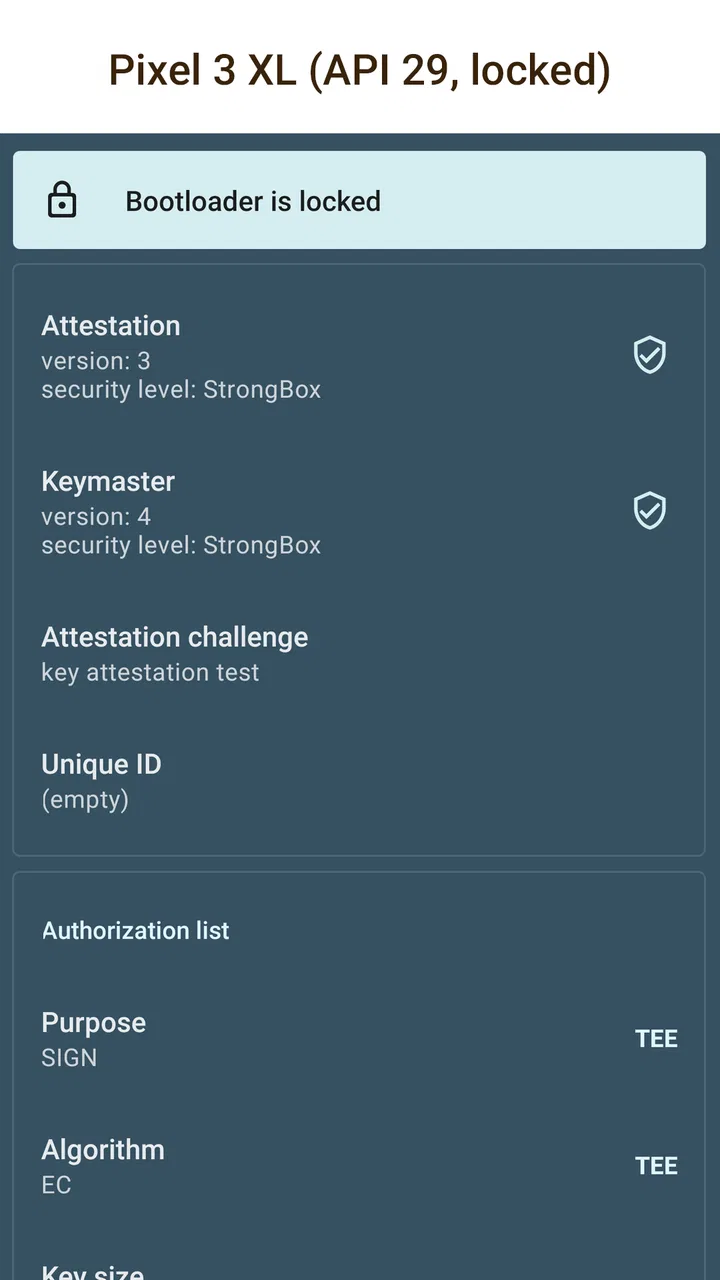
Your first success should be recognizing what the demonstration is showing, not merely producing a screen full of text. Look for the part of the interface that presents the attestation-related result, then read it as a collection of claims rather than as a simple pass-or-fail score.
One practical method is to choose one item and ask three questions. What does this field describe? Is it information about the key, the certificate chain, or the environment? How could an application use it when deciding whether to trust a key? This approach turns a dense technical display into a small investigation that you can finish without already being an expert.
For example, imagine you are building an app that wants to make it harder for a copied credential to be used elsewhere. The important idea is not that Key Attestation magically blocks every attack. The idea is that the app can request evidence associated with a key and make a decision based on that evidence. The demo gives you a way to think through that relationship: key generation, attestation data, interpretation, and an application policy.
That workflow is one of the app’s less obvious benefits. It encourages you to distinguish between a cryptographic operation and the trust decision built around it. A key can perform encryption or signing, but a service may still need additional context before accepting it. Seeing the attestation output helps make that separation concrete.
If the screen looks intimidating, start by identifying repeated structures rather than decoding every technical value. Certificate-related information often forms a chain, while key-related information describes the object being examined. You do not need to memorize every term during the first session. The meaningful win is being able to explain, in your own words, which part is the key and which part is evidence about its origin or protection.
A realistic everyday use case
Consider a developer testing a sign-in feature on a new Android phone. The application creates a key for a device-linked credential, and the developer wants to understand what Android can report about that key. Instead of relying only on documentation, the developer opens this demo on the same phone and studies the attestation result. That does not complete the production security design, but it provides a concrete reference before the developer writes validation rules.
For a learner, the same scenario can become a small study exercise. Write down what you think the app will show, open the demonstration, and compare your expectation with the result. Then research only the fields you cannot explain. This is more efficient than trying to learn every Android security term at once, and it uses the app as an observation tool rather than a mysterious technical display.
Another useful workflow is to capture your own notes, not just a screenshot. A screenshot preserves the appearance of the result, but a short explanation of why a field matters is more valuable later. Record the question you were investigating, the relevant result, and what you think an application would do with it. That habit turns a quick demo into reusable understanding.
Where first-time users can become confused
The biggest point of confusion is the word “attestation.” It does not mean that the app certifies the entire phone as safe in every possible sense. It refers to evidence connected with a cryptographic key and the Android mechanisms involved in producing that evidence. A favorable-looking result should therefore not be treated as a universal security guarantee.
Another common misunderstanding is assuming that the demo itself is protecting your accounts. It is not a replacement for an app’s authentication design. A real service still has to decide which attestation claims it accepts, how it handles unusual results, and what happens when a device cannot provide the expected evidence. The demo can illuminate those decisions, but it does not make them on behalf of another application.
It is also easy to confuse a technical result with a compatibility promise. Android devices differ in their hardware, system software, and security implementations. Even when two phones run compatible Android releases, their security-related behavior may not be identical. I would treat the result as an observation about the device in front of you, not as a guarantee that every Android phone will produce the same output.
That limitation is especially important for developers. Testing on one phone can reveal how the feature works in that environment, but it should not be the only basis for production logic. A robust application needs to consider supported devices, possible variations, and sensible fallback behavior. The demo is excellent for building intuition; it is not a substitute for broader compatibility testing.
Some users may also expect a simple green check mark. Security evidence is rarely that simple. A result can contain useful details without reducing them to one universal judgment. If the app makes you slow down and ask what each claim actually proves, that friction is productive. If you only want a quick “safe” or “unsafe” answer, this is probably the wrong tool.
How it compares with broader Android tools
Compared with a general device-information app, Key Attestation Demo is much less comprehensive but more concentrated. A device-information tool may show processor details, memory, sensors, and software identifiers. That breadth is useful when diagnosing a phone, but it can bury a specialized security question beneath unrelated data. This demo wins when your question is specifically about Android’s key attestation capability.
Compared with reading Android documentation alone, the app offers a more tangible starting point. Documentation explains concepts and APIs, while the demo lets you see a result produced in a real Android environment. I would use both together: read enough to understand the vocabulary, use the app to connect it to a device, then return to the documentation when a field raises a question.
Compared with a commercial security scanner, it serves a completely different purpose. A scanner may focus on threats, risky applications, or suspicious behavior. This app does not compete with that workflow. Its advantage is precision, while its weakness is that it leaves the broader security picture untouched.
There is a similar trade-off with sample code. A code sample can show how a developer requests or processes attestation-related information, but it may require a project, build tools, and debugging. This app offers a quicker first look for someone who is still deciding whether the subject is worth studying. Once you need to integrate the feature into a real product, code and official technical references become more important than the demo alone.
Three habits that make the demo more useful
First, separate observation from interpretation. Copying a displayed value into notes is not the same as understanding it. For every interesting result, write a plain-language explanation beside it. If you cannot explain the field without repeating its label, mark it for later research. This prevents technical vocabulary from creating a false sense of understanding.
Second, use the app before making a security claim. If you are discussing whether a device-backed key can be trusted, open the demonstration and identify exactly which evidence supports your statement. This is a valuable discipline because it exposes the difference between “Android reports this property” and “the device is completely secure.” Those sentences are not interchangeable.
Third, treat unusual output as a question rather than an immediate failure. A result that differs from your expectation may reflect the device, the Android release, or the way the feature is implemented in that environment. Record what happened, compare it with the relevant Android documentation, and test carefully before drawing a conclusion. This is more reliable than assuming that unfamiliar output means the app is broken.
A fourth habit is to keep the demo separate from production credentials. If you are experimenting while developing an application, use test material and a controlled workflow. The app is a learning and inspection aid, not a reason to expose real account secrets or treat a demonstration result as a live authentication system.
What the limitations mean in practice
The app’s narrow scope is both its identity and its main limitation. It does not turn a complicated security topic into a beginner-friendly course, and it does not appear designed to guide a nontechnical user through a complete protection plan. You may need to search for definitions, consult Android development material, or ask a more experienced developer about the meaning of a result.
That extra effort is reasonable for the intended audience, but it changes the recommendation. If you want an app that gives immediate everyday value after installation, choose something aligned with that goal. If you are investigating Android key security, the learning value justifies the specialized interface and the need to read around it.
The age rating of Everyone makes the app broadly accessible from a store-classification perspective, but that should not be confused with beginner-level content. A technical app can be appropriate for all ages while still being most useful to people who are comfortable with unfamiliar security terminology. I would happily let a curious learner explore it, while also explaining the concepts rather than leaving the displayed information to speak for itself.
The free price removes one barrier to experimentation. You can install it to answer a focused question without first committing to a subscription or a larger security suite. Still, free does not mean effortless: the real investment is attention. The app rewards reading and comparison more than casual tapping.
Who should install it next
I recommend giving it a try if you are learning Android security, building an app that uses cryptographic keys, or trying to understand what Key Attestation contributes to a trust decision. Start with one question, use the app to observe the result, and write down what you can explain. That path is much less intimidating than opening it with the expectation that you must understand every technical detail immediately.
I would not recommend it as a general security checkup for a family member, a replacement for account protection, or a way to prove that a phone is safe in every respect. Those needs call for different tools and, often, better security habits rather than a specialized demonstration.
After the first session, the sensible next step is to connect what you observed with Android’s official technical guidance or with a small test project. Ask how an application should validate attestation data, what fallback behavior is appropriate, and which assumptions are safe across devices. The demo is most valuable when it starts that investigation rather than pretending to finish it.
My final view is positive but carefully targeted. Key Attestation Demo is worth installing when your question is about Android key attestation itself; it gives the subject a concrete shape and encourages better security reasoning. It is not a broad utility, and its technical presentation may frustrate anyone seeking an instant answer. For the right reader, though, its focused approach is exactly why it works: you can move from installation to a real observation quickly, then use that observation as a foundation for deeper Android security work.
FAQs for Key Attestation Demo
01What is the Key Attestation Demo app used for?
The Key Attestation Demo app is designed to demonstrate the use of key attestation in Android devices. It showcases how to attest to the properties of a cryptographic key stored in the device's hardware-backed keystore. This ensures that the keys are protected against extraction and unauthorized use, providing enhanced security for sensitive operations.
02Is the Key Attestation Demo app safe to use?
Yes, the Key Attestation Demo app is safe to use. It is intended for developers and security enthusiasts to explore the key attestation process. The app does not perform any malicious activities and is used mainly for educational purposes to understand how key attestation works on Android devices.
03Do I need any special permissions to run the Key Attestation Demo app?
The Key Attestation Demo app may require permissions related to accessing device security features. However, it is important to note that the app does not require unnecessary permissions unrelated to its core functionality. Always check the permissions requested during installation and ensure they align with the app's intended use.
04Can I use the Key Attestation Demo app on any Android device?
The app is designed to work on Android devices that support hardware-backed keystores. However, some older devices might not fully support all features of key attestation. It is recommended to check your device's specifications and ensure it supports the necessary security features before using the app.
05How can I benefit from using the Key Attestation Demo app?
The Key Attestation Demo app is particularly beneficial for developers and security professionals who wish to understand and implement key attestation in their applications. It provides a practical demonstration of the process, helping you ensure that cryptographic keys are securely managed and verified on Android devices.
Pros
- Easy to understand interface
- Supports multiple key types
- Comprehensive documentation
- Quick key generation process
- Free to use with no ads
Cons
- Limited to newer devices
- Requires technical knowledge
- No offline functionality
- Lacks customization options
- Occasional minor bugs

Key Attestation Demo
Gallery